
My assets
My assets is everything you have made or imported, in one place. It shows where each thing stands, and it is where you start something new or bring a file in.
Kinds
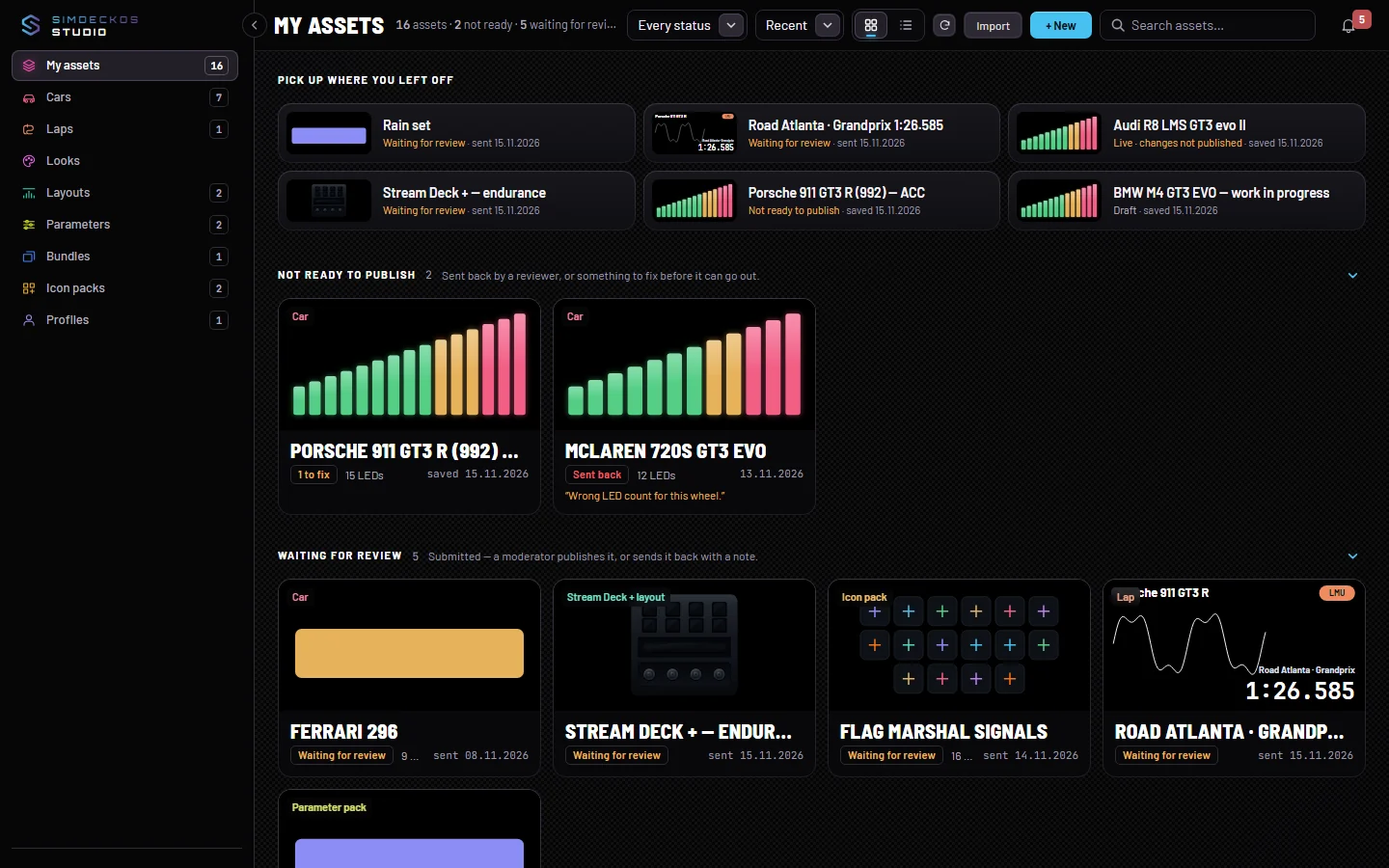
The Workspace rail filters the page by kind, and each entry shows how many you have: Cars, Laps, Looks, Layouts, Parameters, Bundles, Icon packs and Profiles. My assets at the top shows them all. A bundle combines things you have already published, so it comes after them.
On a wide screen the page bar adds the counts that matter, such as 14 assets · 1 not ready · 2 waiting for review.
Where each asset stands
Every asset sits in exactly one group, in the order they want your attention. An empty group is not shown.
- Not ready to publish: sent back by a reviewer, or something to fix before it can go out. The card says Sent back with the reviewer's note, or how many things there are to fix, for example 2 to fix.
- Waiting for review: submitted. A moderator publishes it, or sends it back with a note.
- Drafts: saved privately. Nobody else sees these until you submit them.
- Live: in the Library now.
Each card says its status in words, with the date beside it. Press a group's arrow to fold it. When you have more than six assets, Pick up where you left off shows the last few you changed, one press from their editor. Publish and review explains how an asset moves between the groups.
Finding and opening
The page bar holds Search assets…, a sort (Recent or Name), and a switch between cards and a list. The list suits a long catalogue of cars. The round arrow reads the page again, to pick up what a reviewer has done since.
Press a card to open it in its editor. The More actions menu (the three dots) holds the rest: Edit (or Open for a lap), Rename, Unpublish when it is live, and Delete.
New and Import
+ New starts a Car set, Parameter pack, Profile, Look, Icon pack, Device layout or Bundle (combine assets).
Import brings in a file exported from the plugin. Pick the kind first and the file dialog shows only that kind:
- Car set, Lap, Look, Device layout, Parameter pack or Icon pack.
The file opens in its editor, unsaved. On Profiles, Upload profile opens a profile saved from the plugin.
A new account sees Start here in place of the list: author a car set, or bring one in from the plugin, then publish it. It goes as soon as you own one asset.
Unpublish and delete
Unpublish takes a live asset out of the Library at once, without asking. It stays here as yours.
Delete asks first: "Delete “name” from the Library?" It stops being downloadable. Anyone who already installed it keeps it, and if you publish it again later, its revision count carries on rather than starting over. Press Delete listing to confirm.