Lap analysis
Lap analysis shows your synced laps by venue. Open a venue to compare cars, corners and traces, shifts, grip and launches.
Your venues
Each venue is a card with its track outline, the sims you drove there, your best lap with its car, and how many laps and cars it holds. Sort the list in the bar by Last driven, Most laps or A–Z. Each sim keeps its own best.
The laps come from your rig. If the list is empty, see Lap sync.
One venue
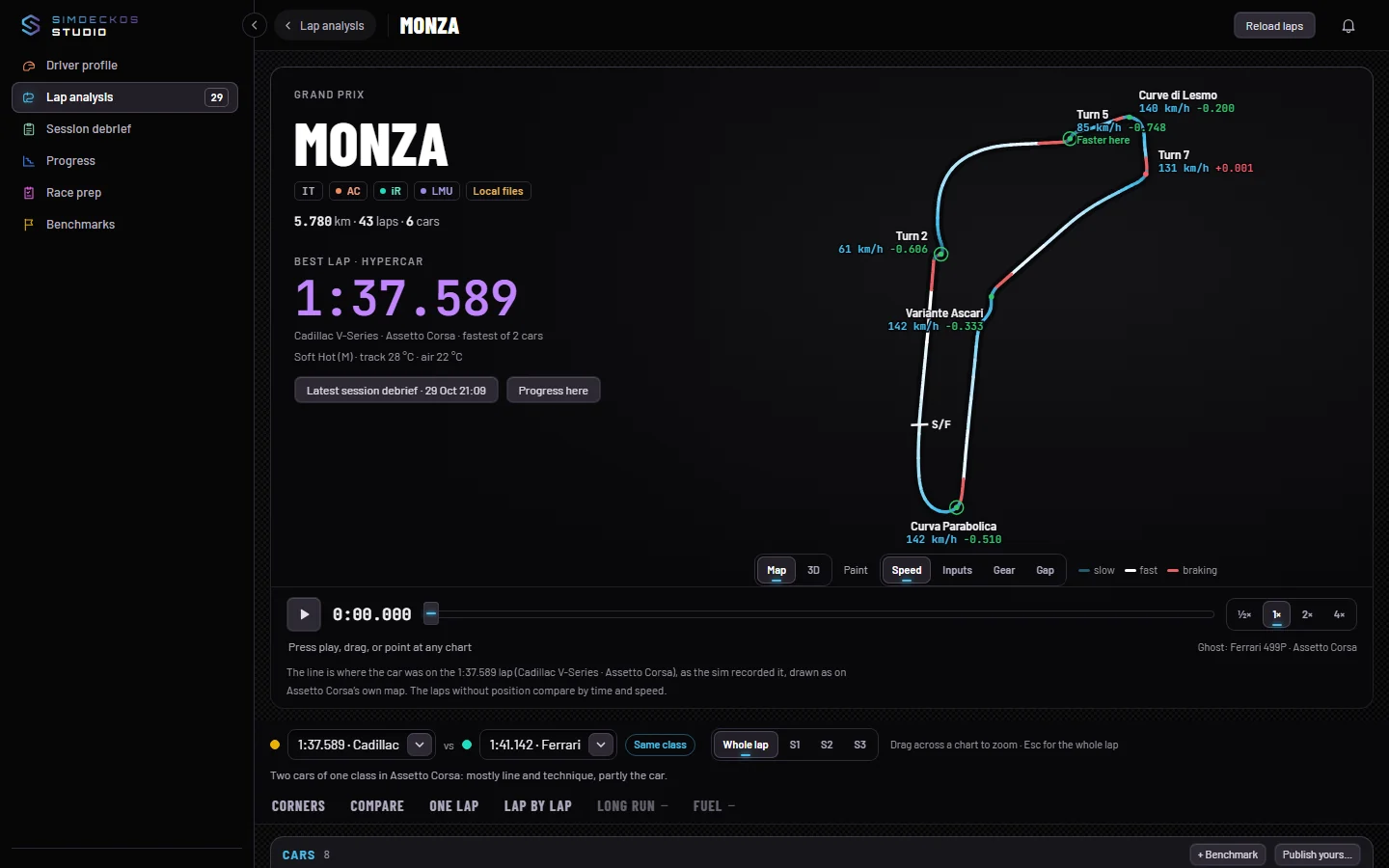
The top of a venue shows its name, the layout, and the best lap in its class with the car that set it. If you drove more than one layout, switch between them there. The map draws the track from your own lap, with its corners numbered.
Two buttons lead on: Latest session debrief opens the venue’s most recent session in Session debrief, and Progress here opens this car’s best over time in Progress.
A bar under the top jumps through the page: Overview, Compare, Corners, One lap and Lap by lap.
Replay and the ghost
Along the foot of the map, press play (or Space) to replay the lap on the track. When you compare, the other car runs beside it as the ghost. Drag the slider to move along the lap.
Cars, compare and corners
Cars lists every car you drove here, grouped by class. Pick one to make it the lap the page reads. + Add a benchmark opens Benchmarks for this car, track and sim, and Publish yours… publishes your lap there as a benchmark.
Beside it, a card says where the time goes, corner by corner. Compare cars and mods sets laps of one class against each other: choose the baseline under Against and switch cars in or out. Comparing needs two laps with a trace in one class.
Corners lists the named corners of the layout. Click a corner, on the map or in a table, to zoom the map and every chart into it. Whole lap (or Esc) goes back. You can also drag across a chart to zoom into a stretch.
One lap in depth
Choose whose lap the sections below read. Then:
- Traces: speed, throttle, brake, gear, rpm, steering, G, clutch and fuel, as far as the lap recorded them, with up to three compared laps over yours.
- Shifts: each shift with its count, mean rpm and spread.
- Grip and steering: lateral against longitudinal G, with a hint where more lock brought no more grip.
- Aids by corner: where TC and ABS acted, and on how many logged laps.
- Launches: standing starts, with release to moving, 0–100, rear slip and whether the bite held.
- Lap by lap: every logged lap with its status, fuel, tyres, brakes, temperatures and aids.
A section says plainly when it has nothing to show. A lap driven before SimDeckOS kept a channel, or a sim that does not report it, gets a sentence, never an empty chart.