
Disk and updates
Mods › Disk & updates shows what is installed, what it takes on disk and what has updates.
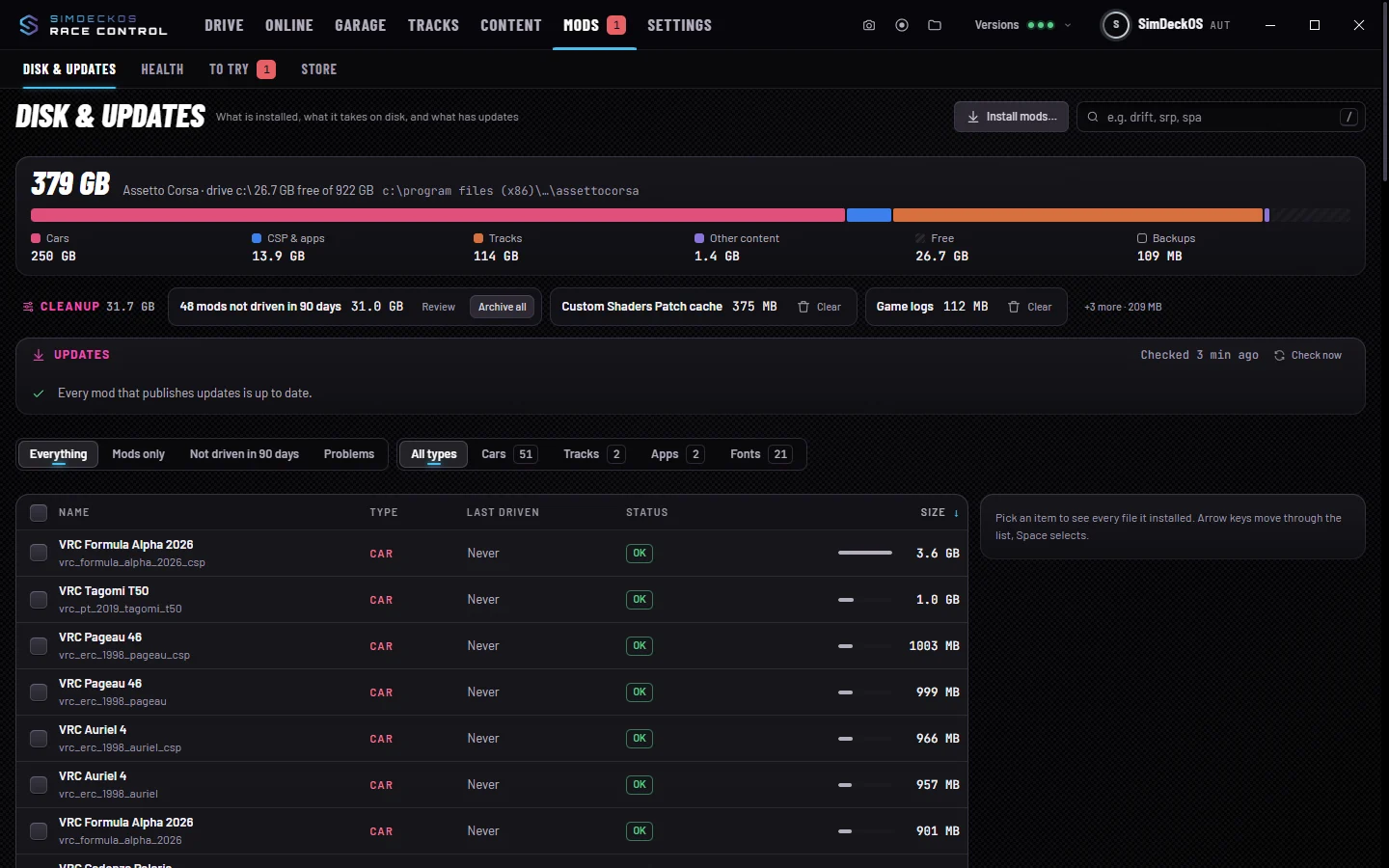
On disk
Assetto Corsa on disk splits the space into cars, CSP and apps, tracks, other content and free space, with the largest items. Sizes include every file a mod installed, wherever it went.
Clean up
- Mods not driven in 90 days: Review or Archive all. Archived mods move out of Assetto Corsa on the same drive; put them back any time from Mods › Health › Put aside.
- Old replays, the CSP cache, game logs and replaced versions: Clear sends them to the Recycle Bin.
- Old downloads of mods that are already installed: hold Remove old downloads and they go to the Recycle Bin. The mods stay installed.
Remove a mod
A mod often puts files outside its own folder: CSP configs, sound lines, app icons. Race Control finds those too. Remove… shows every file, line and setting it added and sends them to the Recycle Bin. A shared file loses only that mod’s lines, after a one-time backup.
Your setups, personal best and ghosts stay unless you tick them. Kunos content can’t be removed here: Steam puts it back.
Install mods
Drop archives (zip, 7z, rar) or folders anywhere on the window, or choose Install mods…: files, or a link (a direct download, or a Google Drive, Dropbox or OneDrive share link). Race Control works with cars, tracks, liveries, apps, CSP configs, tyre packs and Custom Shaders Patch itself. Each item is named by what it is.
While Race Control runs, it also looks in your downloads folder for new archives with mods and offers to install them. It only reads the names inside an archive; nothing is unpacked or moved until you press Install. Settings › Race Control › Downloads & installs has the switch (Look for new mods in downloads) and the folder.
You see what’s inside before anything is copied, and pick Install or Skip for each item. For something already installed, the choice is Replace, Keep both or Skip.
Once a mod is in, the sheet asks whether the download it came from can go: Remove sends it to the Recycle Bin, Keep leaves it. After installing a download (Settings › Race Control › Downloads & installs) sets it for good: Ask, Remove it or Keep it. A download on a network or USB drive is always kept.
Install from a copied link (Settings › Race Control › Downloads & installs, off until you turn it on): copy a download link to a car, track or other mod, come back to Race Control, and it offers to install it. It only reacts to one link to a zip, 7z or rar file, or a Google Drive, Dropbox or OneDrive share, and nothing downloads until you say so.
Updates
Race Control checks mods against Content Manager’s update list (acstuff.club). Only mods whose authors publish there are checked. Install downloads the update and replaces the installed files, keeping a backup of the old folder. Open page is there for mods without a direct download. You can skip a version, or turn the checks off in Settings › Race Control.